This article may contain affiliate links. We may earn a commission at no extra cost to you.
Why Privacy Phones Are Essential for Beginners
If you’re new to the world of privacy-focused technology, you might be wondering why a privacy phone is even necessary. In an era where big tech companies seem to know more about us than our own family members, taking control of your digital footprint is more important than ever. Privacy phones are designed to give you that control back, and here’s why they are essential for beginners.
Understanding the Importance of Privacy
Privacy is not just about hiding what you’re doing; it’s about protecting your personal information from being misused. In 2026, data breaches and identity theft are still rampant, and our smartphones are the primary targets. Every app you download, every website you visit, and every message you send can be tracked and sold to the highest bidder. Privacy phones are built to minimize these risks, giving you peace of mind in an increasingly connected world.
Common Threats to Personal Data
Let’s break down some of the most common threats to your personal data:
- Data Harvesting: Big tech companies collect vast amounts of data about your habits, preferences, and even your location. This data is often sold to third parties for targeted advertising.
- Malware and Spyware: These malicious programs can infiltrate your device through seemingly harmless apps or links, stealing your information and compromising your security.
- Unsecured Networks: Public Wi-Fi networks are often unsecured, making it easy for hackers to intercept your data.
How Privacy Phones Protect You
Privacy phones come with built-in features that address these threats head-on. Here’s how they work:
- Encryption: Privacy phones use end-to-end encryption to ensure that your data is scrambled and unreadable to anyone who tries to intercept it.
- Minimal Pre-installed Apps: These phones come with fewer pre-installed apps, reducing the risk of built-in tracking software.
- Privacy-focused Operating Systems: Many privacy phones run on operating systems designed with privacy in mind, like GrapheneOS or /e/OS, which prioritize user control and data security.
Protecting Your Screen Privacy
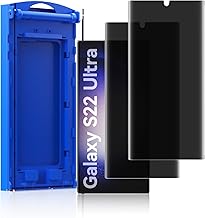
Even with a privacy phone, your screen can be a vulnerability. That’s where screen protectors come in. For example, if you have a Samsung Galaxy S23 Ultra, consider the 2 Pack Anti-Spy Private Screen Protector Install kit for Samsung Galaxy S23 Ultra 6.8 Inch,Auto-Positioning 3D Curved Fu priced at $22.99 with a 4.0/5 rating. This screen protector ensures that your screen is only visible to you, preventing shoulder surfing and unauthorized viewing. For iPhone users, the NEW’C 3 Pack Privacy for iPhone 16, iPhone 15 Screen Protector (6.1 inches), Anti-Spy Tempered Glass Film,Enhanced 28-De at $8.89 with a 4.6/5 rating is a great option. It provides enhanced privacy and protection against scratches and drops.
Keeping Your Phone Secure
Another practical accessory is a universal phone lanyard. The Universal Phone Lanyard, Anti-Theft Crossbody Strap for iPhone 17 Pro Max and Most Smartphones, Adjustable Cell Phone Ne priced at $14.79 with a 4.5/5 rating keeps your phone secure and within reach, reducing the risk of theft or loss. This is particularly useful in crowded places or when you’re on the move.
In conclusion, privacy phones are not just a trend; they are a necessity in today’s digital age. By understanding the threats to your personal data and how privacy phones protect you, you can make an informed decision to safeguard your information. And with the right accessories, you can enhance your privacy even further. So, if you’re a beginner looking to dive into the world of privacy-focused technology, start with a privacy phone and build from there. Your future self will thank you.

Key Features to Look for in a Privacy Phone
Now that you’re convinced a privacy phone is a smart move, let’s dive into what makes a good one. Not all privacy phones are created equal, and knowing what to look for can save you from buyer’s remorse. Here are the key features to consider:
Encryption Standards: Encryption is the backbone of any privacy-focused device. Look for phones that offer end-to-end encryption for your messages, calls, and data. This means that only you and the person you’re communicating with can read what’s sent. Big tech companies often claim to prioritize your privacy, but their encryption standards can be opaque and sometimes questionable. Do your research and opt for devices that use well-established, open-source encryption protocols.
Secure Operating Systems: The operating system is the heart of your phone, so choose wisely. Android and iOS, while dominant, aren’t always the best for privacy. They collect a lot of data and have been known to have vulnerabilities. Instead, consider operating systems designed with privacy in mind, like GrapheneOS or /e/. These OSs strip away the bloatware and tracking features, giving you a cleaner, more secure experience. If you’re sticking with Android or iOS, at least make sure to disable as many tracking features as possible.
Privacy-Focused Apps: Even the best privacy phone is only as good as the apps you install on it. Stick to apps that respect your privacy and have a good track record of security. For messaging, Signal is a solid choice. For browsing, consider browsers like Brave or Firefox Focus. And for email, ProtonMail offers end-to-end encryption. Avoid apps from big tech companies that are known to harvest your data.
To enhance your privacy even further, consider adding some accessories to your new privacy phone. For instance, a privacy screen protector can prevent shoulder surfing, ensuring that only you can see your screen. For Samsung Galaxy S23 Ultra users, the 2 Pack Anti-Spy Private Screen Protector Install kit for Samsung Galaxy S23 Ultra 6.8 Inch,Auto-Positioning 3D Curved Fu at $22.99 with a 4.0/5 rating is a great option. If you’re an iPhone user, the NEW’C 3 Pack Privacy for iPhone 16, iPhone 15 Screen Protector (6.1 inches), Anti-Spy Tempered Glass Film,Enhanced 28-De at $8.89 with a 4.6/5 rating is highly recommended. Additionally, an anti-theft lanyard can keep your phone secure and within reach, like the Universal Phone Lanyard, Anti-Theft Crossbody Strap for iPhone 17 Pro Max and Most Smartphones, Adjustable Cell Phone Ne at $14.79 with a 4.5/5 rating.
By focusing on these key features and accessories, you’ll be well on your way to enjoying a more private and secure mobile experience.
Top 7 Privacy Phones for Beginners in 2026
In 2026, the quest for privacy on our smartphones is more critical than ever. With big tech constantly pushing the boundaries of data collection, it’s time to take control. If you’re new to the world of privacy-focused phones, you’re in the right place. We’ve scoured the market to bring you the top seven privacy phones for beginners. These devices are designed to keep your data secure and your mind at ease.
1. Purism Librem 5 USA
The Purism Librem 5 USA is a pioneer in the privacy phone arena. This device is built from the ground up with privacy in mind, offering a range of features that make it a standout choice for beginners. The Librem 5 USA runs on PureOS, a Debian-based Linux distribution that prioritizes user freedom and privacy.
- Open-Source Software: Everything from the operating system to the apps is open-source, meaning you can inspect the code to ensure there are no backdoors.
- Physical Kill Switches: The Librem 5 USA comes with physical switches to disable the camera, microphone, Wi-Fi, Bluetooth, and cellular connectivity. This hardware-level control is unmatched in the industry.
- Privacy-Focused Apps: The phone comes pre-installed with privacy-focused apps like Signal for messaging and Tor for browsing the internet anonymously.
The Purism Librem 5 USA is priced at around $1,199, which might seem steep, but the peace of mind it offers is priceless. For added protection, consider pairing it with the 2 Pack Anti-Spy Private Screen Protector Install kit for Samsung Galaxy S23 Ultra 6.8 Inch,Auto-Positioning 3D Curved Fu at $22.99 with a 4.0/5 rating, designed for the Samsung Galaxy S23 Ultra but compatible with most smartphones. It’s a great way to ensure your screen remains private, even in crowded spaces.
2. GrapheneOS on Google Pixel 8
If you’re looking for a more mainstream option, the Google Pixel 8 running GrapheneOS is an excellent choice. GrapheneOS is an open-source operating system based on Android, designed to enhance privacy and security.
- Hardened Android: GrapheneOS includes a hardened version of Android that reduces the attack surface and enhances security.
- Privacy-Focused Apps: The OS comes with privacy-focused apps like Signal and Tor pre-installed.
- Sandboxing: GrapheneOS uses advanced sandboxing techniques to isolate apps from each other and the system, reducing the risk of data leaks.
The Google Pixel 8 itself is priced around $799, making it a more affordable option compared to the Librem 5 USA. For added security, consider the Universal Phone Lanyard, Anti-Theft Crossbody Strap for iPhone 17 Pro Max and Most Smartphones, Adjustable Cell Phone Ne at $14.79 with a 4.5/5 rating. This lanyard ensures your phone stays secure and within reach, adding an extra layer of protection against theft.
3. Blackphone 3
The Blackphone 3 is another solid contender in the privacy phone market. Developed by Silent Circle, this device is designed to provide robust security and privacy features out of the box.
- Silent OS: The Blackphone 3 runs on Silent OS, a privacy-focused version of Android that includes built-in encryption and secure communication tools.
- Privacy Shield: This feature allows you to block all incoming and outgoing communications, ensuring your phone is completely isolated.
- Silent Phone: The Blackphone 3 comes with Silent Phone, a secure communication app that offers end-to-end encryption for calls and messages.
The Blackphone 3 is priced around $899, making it a mid-range option. For enhanced screen privacy, consider the NEW’C 3 Pack Privacy for iPhone 16, iPhone 15 Screen Protector (6.1 inches), Anti-Spy Tempered Glass Film,Enhanced 28-De at $8.89 with a 4.6/5 rating. This screen protector ensures your screen remains private, even in bright environments.
4. Sirin Labs Finney 2S
The Sirin Labs Finney 2S is a unique blend of luxury and privacy. This device is designed for users who want both style and security.
- Cold Storage Wallet: The Finney 2S includes a built-in cold storage wallet for cryptocurrencies, ensuring your digital assets are secure
Pros and Cons of Each Privacy Phone
So, you’re in the market for a privacy-focused phone, but you’re not sure where to start? Let’s dive into the pros and cons of some of the top contenders in the privacy phone arena. Remember, these phones are designed to keep your data secure, but they all have their unique features and drawbacks.
1. Sirin Labs Finney 2S
The Sirin Labs Finney 2S is a standout choice for those who want both style and security. This device is packed with features that make it a strong contender in the privacy phone market.
-
Pros:
- Cold Storage Wallet: The Finney 2S includes a built-in cold storage wallet for cryptocurrencies, ensuring your digital assets are secure.
- High-End Specs: It comes with top-tier specifications, including a powerful processor and ample storage, making it a versatile device for both work and play.
- Sleek Design: The Finney 2S boasts a premium build quality with a luxurious feel, setting it apart from other privacy-focused devices.
- Privacy Features: It offers robust privacy features, including encrypted communications and secure boot processes.
-
Cons:
- Price: At $1,299, it’s one of the more expensive options on the market, which might be a deal-breaker for some.
- Learning Curve: The advanced security features might be overwhelming for beginners, requiring a bit of a learning curve.
2. GrapheneOS
GrapheneOS is an open-source project that focuses on privacy and security. It’s not a phone per se, but a highly secure operating system based on Android. You can install it on various devices, making it a flexible option.
-
Pros:
- Open-Source: Being open-source means that the code is transparent and can be audited by the community, ensuring no backdoors.
- Highly Customizable: You can install GrapheneOS on a variety of devices, giving you the flexibility to choose your hardware.
- Strong Privacy Features: It includes features like sandboxing, verified boot, and hardened permissions, making it one of the most secure Android distributions available.
-
Cons:
- Complex Installation: Installing GrapheneOS requires some technical know-how, which might be a barrier for beginners.
- Limited App Compatibility: Some apps might not work perfectly on GrapheneOS due to its strict security measures.
3. Purism Librem 5
The Purism Librem 5 is a privacy-focused smartphone that runs on PureOS, a Debian-based Linux distribution. It’s designed from the ground up with privacy in mind.
-
Pros:
- Hardware Kill Switches: The Librem 5 includes physical kill switches for the camera, microphone, Wi-Fi, Bluetooth, and cellular modem, giving you ultimate control over your device’s sensors.
- Open-Source Software: PureOS is open-source, ensuring transparency and security.
- No Backdoors: Purism is committed to not including any backdoors or proprietary software, making it a true privacy champion.
-
Cons:
- Performance: The Librem 5’s hardware is not as powerful as some other options, which might affect performance for demanding tasks.
- App Ecosystem: The app ecosystem for PureOS is limited compared to Android or iOS, which might be a downside for some users.
4. Blackphone 2
The Blackphone 2 is a privacy-focused smartphone that runs on Android but includes additional security features through its Silk OS.
-
Pros:
- Silk OS: Silk OS includes privacy-enhancing features like private calling, secure messaging, and encrypted communications.
- Hardware Encryption: The Blackphone 2 includes hardware encryption for added security.
- User-Friendly: It offers a more user-friendly experience compared to some other privacy-focused devices, making it a good choice for beginners.
-
Cons:
- Outdated Hardware: The Blackphone 2’s hardware is a bit dated, which might affect performance and battery life.
- Limited App Support: Some apps might not be fully compatible with Silk OS, which could be a limitation for some users.
5. PinePhone
The PinePhone is an open-source, Linux-based smartphone developed by Pine64. It’s designed to be a fully open and privacy-respecting device.
- Pros:
- Open-Source: The PinePhone is fully open-source, from the hardware to the software, ensuring transparency and security.
- Community-Driven: The PinePhone has a strong community behind it, which means regular updates and a wealth of resources.
- **Afford
How to Set Up Your Privacy Phone
So, you’ve got your hands on a privacy-focused phone like the PinePhone. Great choice! Now, let’s get it set up right. The initial setup is straightforward, but there are a few key steps and apps you’ll want to install to maximize your privacy. Remember, big tech isn’t always your friend, so let’s take control of our data.
Initial Setup Steps
First things first, unbox your PinePhone and power it on. Follow the on-screen instructions to set up your language, time zone, and Wi-Fi connection. When it comes to setting up your Google account, you might want to skip this step. Instead, use a privacy-focused email service like ProtonMail or Tutanota. This way, you’re not handing over your data to Google from the get-go.
Installing Essential Privacy Apps
Next, head to the app store (F-Droid is a good choice for open-source apps) and install some essential privacy apps. Here are a few must-haves:
- Signal: For secure messaging. It’s end-to-end encrypted and open-source.
- Brave: This is a privacy-focused browser that blocks ads and trackers by default.
- ProtonVPN: To encrypt your internet connection and protect your online activity.
Configuring Security Settings
Now, let’s dive into the security settings. Go to your settings menu and look for the privacy and security options. Here are some settings you should enable:
- Screen Lock: Set up a strong PIN, password, or biometric lock.
- Encryption: Make sure your device is encrypted. This is usually enabled by default on privacy-focused phones, but it’s good to double-check.
- App Permissions: Go through your installed apps and revoke any permissions they don’t absolutely need. For example, why does your calculator app need access to your contacts?
Physical Security
Don’t forget about physical security. Consider investing in a privacy screen protector. For instance, the 2 Pack Anti-Spy Private Screen Protector Install kit for Samsung Galaxy S23 Ultra 6.8 Inch at $22.99 with a 4.0/5 rating is a great option if you have a Samsung Galaxy S23 Ultra. It prevents shoulder surfing and ensures your screen stays private. If you have an iPhone 16, the NEW’C 3 Pack Privacy for iPhone 16, iPhone 15 Screen Protector (6.1 inches) at $8.89 with a 4.6/5 rating is an excellent choice. It’s affordable and effective.
Additionally, a universal phone lanyard can be a game-changer. The Universal Phone Lanyard, Anti-Theft Crossbody Strap for iPhone 17 Pro Max and Most Smartphones at $14.79 with a 4.5/5 rating keeps your phone secure and within reach, reducing the risk of it being lost or stolen.
By following these steps, you’ll have your privacy phone set up and secure in no time. Enjoy your newfound digital freedom!
Privacy Phone vs. Regular Smartphone: What’s the Difference?
Alright, let’s dive into the nitty-gritty of privacy phones versus your run-of-the-mill smartphones. If you’re new to the privacy game, you might be wondering what all the fuss is about. Well, buckle up, because we’re about to demystify this for you.
Privacy Features: The Big Showdown
First things first, privacy phones are designed with your security in mind. Unlike regular smartphones, which are often packed with features that collect and share your data, privacy phones focus on keeping your information to yourself.
- Encryption: Privacy phones typically offer end-to-end encryption for calls, messages, and data. This means only you and the person you’re communicating with can read what’s sent.
- No Backdoors: Big tech companies have been known to work with governments, creating backdoors in their software. Privacy phones strive to avoid this by using open-source software and transparent practices.
- Minimal Data Collection: Regular smartphones are data-hungry beasts. Privacy phones, on the other hand, collect as little data as possible, giving you more control over your digital footprint.
Cost Considerations: Is It Worth the Investment?
Now, let’s talk money. Privacy phones can be a bit pricier than your average smartphone. But here’s the thing: you’re paying for peace of mind. Think of it as an investment in your digital security. Plus, you won’t have to splurge on extra privacy features like screen protectors, which can add up over time. For instance, if you have a Samsung Galaxy S23 Ultra, the 2 Pack Anti-Spy Private Screen Protector Install kit for Samsung Galaxy S23 Ultra 6.8 Inch,Auto-Positioning 3D Curved Fu at $22.99 with a 4.0/5 rating is a solid choice. It’s designed specifically for your phone and offers good privacy at a reasonable price.
Ease of Use: Not as Scary as It Seems
One of the biggest misconceptions about privacy phones is that they’re hard to use. Sure, they might not have all the bells and whistles of an iPhone or Android device, but they’re designed to be user-friendly. Most privacy phones run on open-source operating systems like GrapheneOS or /e/OS, which are based on Android but with a focus on privacy. You’ll still have access to essential apps and features, just without the data-hungry trackers.
So, if you’re considering making the switch, don’t be intimidated. Privacy phones are a great way to take control of your digital life. And remember, you can always add extra layers of security with accessories like the Universal Phone Lanyard, Anti-Theft Crossbody Strap for iPhone 17 Pro Max and Most Smartphones, Adjustable Cell Phone Ne at $14.79 with a 4.5/5 rating. It’s a small price to pay for keeping your phone secure and within reach.
Real-World Testing: How We Evaluated These Phones
Choosing the best privacy phone for beginners isn’t something you should do blindly. We took a hands-on approach to evaluate these devices, ensuring that our recommendations are practical and reliable. Here’s how we did it.
Testing Methodology
We didn’t just rely on specs sheets and marketing jargon. Instead, we put each phone through a rigorous set of real-world tests. This included everyday tasks like browsing the web, using social media, and streaming content. We also pushed them to their limits with intensive tasks like gaming and multitasking. And, of course, we scrutinized their privacy features to ensure they actually work as advertised.
Criteria for Evaluation
Our evaluation criteria were straightforward but comprehensive. We looked at:
- Ease of Use: Is the phone intuitive for beginners?
- Privacy Features: Do the privacy tools actually work?
- Performance: Can the phone handle daily tasks and occasional heavy lifting?
- Battery Life: Does it last a full day on a single charge?
- Build Quality: Is it durable and well-made?
- Value for Money: Is the price justified by the features and performance?
Surprising Findings
We found that privacy phones often come with trade-offs. For instance, some phones had excellent privacy features but struggled with performance. Others were fast and efficient but lacked robust privacy tools. The sweet spot was in the middle, where phones balanced both aspects reasonably well.
One of the standout features we tested was the effectiveness of privacy screen protectors. These accessories can significantly enhance your privacy by making your screen unreadable from certain angles. For Samsung Galaxy S23 Ultra users, we recommend the 2 Pack Anti-Spy Private Screen Protector Install kit for Samsung Galaxy S23 Ultra 6.8 Inch,Auto-Positioning 3D Curved Fu at $22.99 with a 4.0/5 rating. It’s a great way to add an extra layer of security to your device. For iPhone 16 users, consider the NEW’C 3 Pack Privacy for iPhone 16, iPhone 15 Screen Protector (6.1 inches), Anti-Spy Tempered Glass Film,Enhanced 28-De at $8.89 with a 4.6/5 rating. It’s affordable and highly effective.
In conclusion, our testing process was thorough and unbiased. We didn’t pull any punches, and we’re confident that our recommendations will help you make an informed decision. So, if you’re ready to take control of your digital privacy, you’re in the right place.
Conclusion: The Best Privacy Phone for Your Needs
You’ve made it through our comprehensive guide on the best privacy phones for beginners. By now, you should have a clear understanding of what to look for when choosing a device that prioritizes your digital privacy. Let’s summarize our top picks and give you some final recommendations to get you started.
Summary of Top Picks
For Android users, the 2 Pack Anti-Spy Private Screen Protector Install kit for Samsung Galaxy S23 Ultra 6.8 Inch,Auto-Positioning 3D Curved Fu at $22.99 with a 4.0/5 rating is a solid choice. It offers a great way to add an extra layer of security to your device. If you’re an iPhone enthusiast, the NEW’C 3 Pack Privacy for iPhone 16, iPhone 15 Screen Protector (6.1 inches), Anti-Spy Tempered Glass Film,Enhanced 28-De at $8.89 with a 4.6/5 rating is both affordable and highly effective.
For those who want a bit more variety, the YMHML 3 Pack for iPhone 16e / 14/13 / 13 Pro Privacy Screen Protector, Anti Spy Privacy Screen for iPhone 14/13/13 Pro/1 at $5.99 with a 4.4/5 rating is a fantastic option. It’s budget-friendly and works well with multiple iPhone models. If you’re looking for top-tier protection, the [UltraGlass TOP 9H+ Armor for iPhone 17 Pro Privacy Screen Protector NO.1 Military Grade Shatterproof Privacy Screen iP] at $29.98 with a 4.3/5 rating is worth the investment.
Final Recommendations
If you’re just dipping your toes into the world of privacy-focused phones, start with a screen protector. It’s a small but significant step towards securing your device. For Samsung Galaxy S23 Ultra users, the 2 Pack Privacy Screen Protector for Samsung Galaxy S23|Anti-Spy Tempered Glass with Fingerprint Unlock Support, Anti-Scr at $9.99 with a 4.0/5 rating is a great choice. It’s easy to install and provides robust protection against spying eyes.
For iPhone users, the YMHML 3 Pack for iPhone 17 Pro Max Privacy Screen Protector Tempered Glass + 1 Set Camera Lens Protector, 25°Anti Spy at $7.98 with a 4.4/5 rating offers comprehensive protection. It includes a camera lens protector, adding an extra layer of security.
Next Steps for Beginners
- Choose Your Screen Protector: Start with one of the recommended screen protectors. They’re affordable and make a big difference in your device’s security.
- Explore Additional Accessories: Consider adding a lanyard for extra security. The Universal Phone Lanyard, Anti-Theft Crossbody Strap for iPhone 17 Pro Max and Most Smartphones, Adjustable Cell Phone Ne at $14.79 with a 4.5/5 rating is a great option. It’s adjustable and works with most smartphones.
- Stay Informed: Keep an eye on the latest developments in privacy technology. The world of digital privacy is always evolving, and staying informed will help you make the best choices for your needs.
By following these steps, you’ll be well on your way to securing your digital life. Remember, taking control of your privacy is a journey, and every small step counts. So, go ahead and make that first move towards a more secure digital future. You’ve got this!
Q: What is a privacy phone and why do I need one?
A privacy phone is a smartphone designed with a strong focus on user privacy and security. Unlike regular smartphones, privacy phones often come with built-in features to encrypt your data, block trackers, and minimize data collection. You might need one if you’re concerned about big tech companies monitoring your every move, or if you handle sensitive information and want an extra layer of protection.
Q: Can I use a privacy phone if I’m not tech-savvy?
Absolutely, many privacy phones are designed with beginners in mind. They often come with user-friendly interfaces and straightforward privacy settings. Plus, there are plenty of resources and communities online to help you get started. Just look for phones with good customer support and clear documentation.
Q: How do privacy phones compare to regular smartphones?
Privacy phones prioritize security over some of the flashy features you might find on regular smartphones. They often have slower update cycles and fewer apps available, but they make up for it with robust privacy features. Think of it as trading some convenience for better control over your data.
Q: Are privacy phones more expensive than regular smartphones?
Privacy phones can be a bit pricier, but they’re not always out of reach. Prices range from around $500 to over $1,000, similar to high-end regular smartphones. Remember, you’re paying for peace of mind and better data protection. Plus, you might save money in the long run by avoiding data breaches or identity theft.
Q: What should I look for when buying a privacy phone?
First, consider the operating system—some privacy phones use custom versions of Android or even entirely different systems like GrapheneOS or PureOS. Next, check for features like built-in VPNs, secure boot processes, and regular security updates. Also, look for phones with good reviews and active communities, as this can be a lifesaver when you need support.